DSBC Top 100 Images - The Screensaver

vexorg

Flinger of mud
Apparently I have too much time on my hands, because I just made up a screensaver for DSBC. It's made up of the top 100 most viewed images from the DSBC forum, put into a slideshow screensaver. I've put it up at http://www.penguinpowered.ca/dsbc/DSBC_Top_100.scr instead of in the photo gallery, as it doesn't allow the upload of .scr files and it exceeds the max size for a post attachment at 9MB.

To just try out the screensaver without installing it, just download and double-click on it. If you want to install it, either copy or move it to your c:\windows\system32 directory, or right click on it and select "install".
 

vexorg

Flinger of mud
imported post

imported post

Works for me in XP SP3, it's one of hte machines I tested it on. When you say it doesn't work, can you be more specific? And how are you tryin to start it?
 

SubMann

New member
imported post

imported post

Works for me. XP Pro SP3 dual monitor. That's cool 'cause I can run it on one monitor while I type this on another monitor.
 

Phoenix

New member
imported post

imported post

Worked for me on XP Homely SP3, might be a glich though 'cause I didn't see my favourite pic of me:shock:.
 

Lucky

New member
imported post

imported post

vexorg wrote:
Works for me in XP SP3, it's one of hte machines I tested it on. When you say it doesn't work, can you be more specific? And how are you tryin to start it?
throw it to c:\windows\system32
Opened Display properties>Screen Saver>choose DSBC>Apply>OK

When the time for screen saver - display jitters once and nothing happening.
 

Lucky

New member
imported post

imported post

Sometimes when I go Opened Display properties>Screen Saver>

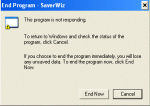
I have a message:
 

Attachments

  • SaverWiz.gif
    SaverWiz.gif
    7.4 KB · Views: 0

250ccforme

Member
imported post

imported post

Lucky, right after rebooting your computer try going to the downloaded screensaver file, right-click it, then click TEST. If you get a verification box, select RUN. I was having trouble viewing it until I did this.
 

Lucky

New member
imported post

imported post

250ccforme,
After reboot:
Test doesn't work,
Preview too.
But screen saver starts. One more problem appeared: turn PC OFF :) . It can't close SaverWiz
 

250ccforme

Member
imported post

imported post

Turns out it only worked for me once. Preview option has disappeared. If all else fails, Lucky, just pull the plug to shut the computer down. At least on my XP machine that didn't seem to do any harm when I had to resort to that harsh method. YOUR MILEAGE MAY VARY. :shock:
 

vexorg

Flinger of mud
imported post

imported post

Wish I could give some input on why it's not working for you guys. I've tried it on Win2k, WinXP SP3, and Win2k3, works fine on all of them. Even when running it multiple times in a row, still no probs.
 

DRZSMS

New member
imported post

imported post

Have you ever thought of submitting this for the DSBC booth at the Motorcycle show?
Saves me the effort of digging up picture for that slide show idea.
I'm sure Judy will pipe in sooner or later.
 

JavaJude

Super Moderator
imported post

imported post

DRZSMS wrote:
Have you ever thought of submitting this for the DSBC booth at the Motorcycle show?
Saves me the effort of digging up picture for that slide show idea.
I'm sure Judy will pipe in sooner or later.

It only took me a month to read this thread and pipe in.

YES. . . . . I would very much like to have this on a DVD so we can play it at the MC Show in January.
 

tobster

New member
imported post

imported post

hmmm

i just get a message saying 'nothing here no 404 etc im just a bored server'

i guess this is a joke
 

vexorg

Flinger of mud
imported post

imported post

That's my server, it's just a modified 404 error for geeks like me. Been too busy riding etc to get the site back up again, hope to get to it in the next week or so. I will post here when the link is accessible again.
 
Top